weight-hangingBulk Finder

Find verified emails at scale with Bulk Finder.

The Clearout Bulk Email Finder is used to discover email addresses in bulk and download enriched results with confidence scores. The bulk finder efficiently handles the simultaneous processing of hundreds or thousands of prospects, optimizing scalability.

It provides flexibility by accommodating CSV or Excel data uploads and downloads. Intelligent functionalities, including automatic duplicate identification, quality metrics, and deliverability insights, guarantee data precision.

By preventing charges for duplicate or missing records, the solution encourages efficient use and aids in cost management.

Where to Find It in App

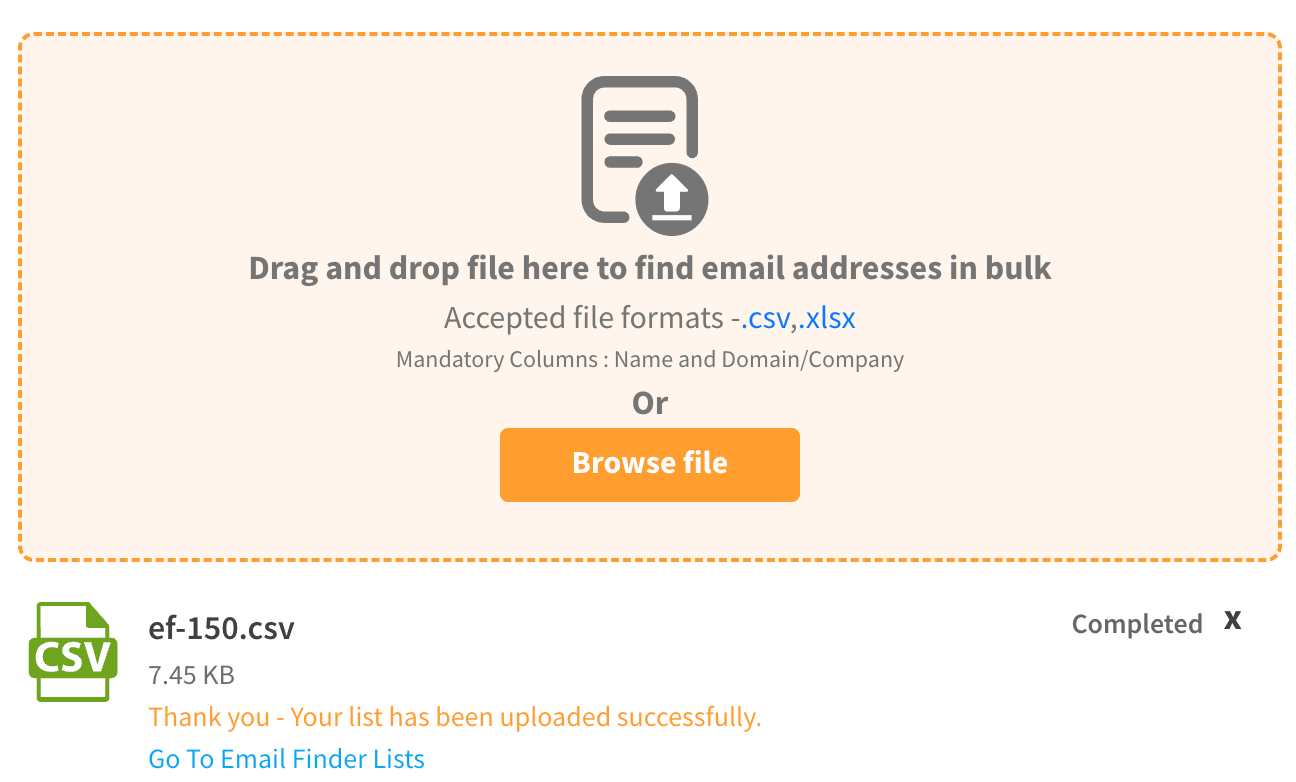
Upload List with Name and Company name or Domain

Supported File Types

Format
Details
Sample Files

.csv

Comma-separated value files

.xlsx

Excel workbook (first sheets supported)

Required Columns

Your file must include these two columns:

Column
Description
Example

Name

Prospect's full name or first name

"John Smith" or "John"

Domain/Company

Company domain or company name

"microsoft.com" or "Microsoft"

circle-info

Optional Columns

You can add any additional columns you want and they'll be preserved in your results:

  • Job Title

  • Location

  • Department

  • Source

  • Custom fields

  • Any other data

File Size & Limits

  • Maximum file size: No strict limit (process files with millions of records)

  • Recommended: For faster processing, consider splitting very large files (100k+ records) into multiple batches

Start Email Finding

1

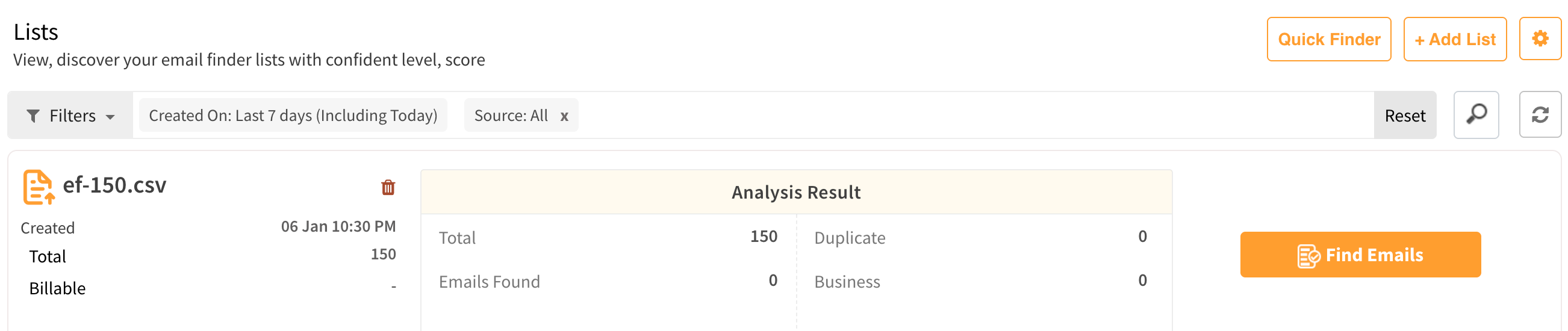
Click Email Finder → Listarrow-up-right.​

2

Find your uploaded list

3

Click the "Find Emails" button, and processing begins!

Starting the Email finding process for uploaded list

Processing time depends on:

  • Number of records

  • Current system load

  • Data quality

You can close the page; the email finding process will continue in the background, and you will receive an email notification immediately after it is completed.

Cancel Finding

Did you initiate the bulk email finding for the wrong file? Don't worry, Clearout supports cancellation of the file "in progress".

  • By cancelling email finding, credits will be charged for any found email addresses, while unfound email addresses will be listed as 'Not found' with the reason 'Request Cancelled' without being charged.

  • In some cases, cancelling the request may take up to 15 minutes to complete.

Duplicate File Identification

Clearout automatically assesses whether a file upload has been run to find email addresses previously or not and tells you when a duplicate file is uploaded for email finding so you can confirm. This function is supported in the WebApp & API for the Email Finder.

Download Discovered List

The results can be downloaded in .csv and .xlsx formats by clicking on 'Download' button

If you encounter any difficulty locating the downloaded result, please consider trying these steps. Try these

  • Please check the 'Download' folder on your system.

  • Please clear the 'cache' and try the download once more.

  • Check browser pop-up blockers enabled

  • Try downloading in "incognito" mode.

  • Use a different browser

  • Contact us if the issue continues to occur

circle-info

For large files, the download link will be shared over the registered email.

Status

The status provides a broad picture of the quality of the email addresses found.

Primary Status
Description

Found

This status shows that the email finder has successfully found the email address of the ideal prospect.

Not Found

This status indicates that the email finder was unable to find the ideal prospect's email address, and it will mention the reason.

Understanding Email Finding Results

Name
Description

Business Account

The appended columns show if an email address belongs to a business account.

Duplicate

Any email list with the same data (first name, last, name, domain/company name) more than once, leading to the same result, is categorized as duplicates.

The user will not be charged for the duplicates.

Confidence Level

An email deliverability scale that indicates how good the discovered email addresses are for a list and how good the list can be for cold email outreach campaigns. Categorized as high, medium, and low.

Confidence Score

An AI-based percentile allotted to each email address that indicates the accuracy level with which the discovered email address matches the lead in the query.

Result File Headers

Name
Description

Clearout Finder Full Name

Displays the full name used for the email finding on Clearout.

Clearout Finder First Name

Displays the first name used for the email finding on Clearout.

Clearout Finder Last Name

Displays the last name used for the email finding on Clearout.

Clearout Finder Domain

Displays the domain associated with the prospect.

Clearout Finder Company

Displays the name of the company associated with the prospect.

Clearout Finder Email Address

Displays the email address found by Clearout Email Finder.

Clearout Finder Confidence Score

Displays the Confidence score in form of numbers that may be different for each email address.

Clearout Finder Business Account

Displays if the found email address is a business account or not. The result is in the form of 'Yes' or 'No'.

Clearout Finder Status

Displays if Clearout was able to find an email address for the input.

Clearout Finder Reason

Provides more information about the status of the email found or the reason for not able to find an email address.

Clearout Finder Processed At (UTC)

Provides the exact time at which the email address was found.

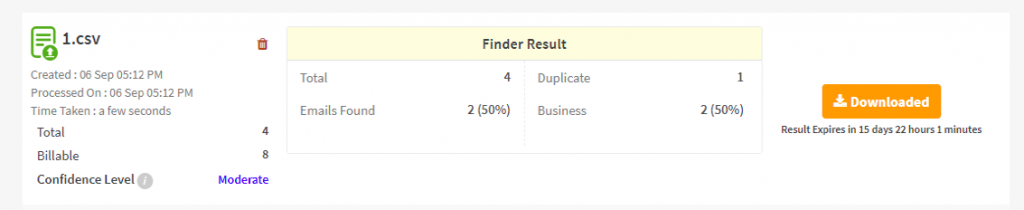
Finder List Analysis

This brief and quick analysis offers an instant review of the overall email finder result before downloading the actual detailed result.

Download the result after bulk finding

The information it provides

  • Percentage and count of the emails found.

  • Total counts for 'Duplicate' and 'Business Accounts'

On the left, you will find a brief overview of the list.

  • The name of the list

  • The list includes the date of creation and the date of processing.

  • Time taken for finding the results

  • Total number of inputs in the list

  • Billable count indicates the credits have been used.

  • The Confidence Level is an email deliverability scale that indicates the quality of the discovered email addresses on a list and their effectiveness for cold email outreach campaigns. It can be high, low, or moderate depending on the quality of data provided

Remove List

Bulk finder list files can be deleted either before or after finding email addresses by using the 'bin' icon next to the list name.

Files cannot be deleted while finding is in progress

Remove the list after bulk finding

Data Retention & Result File Availability

Retention Period

  • Input list and result files are retained for 30 days from the date of processing

  • After 30 days, input and result files are automatically deleted from the system

Email Notifications

Clearout will send automated email notifications:

  • Day 25: First reminder - "Your Bulk Finder results will be deleted in 5 days"

  • Day 29: Final reminder - "Your Bulk Finder results will be deleted in 1 day"

What You Should Do

To preserve results beyond 30 days:

  • Download result files within 30 days of processing

  • Save files locally or to cloud backup storage

  • Export to your CRM or third-party systems using integrations

  • Use the API for programmatic data storage

After Deletion

  • Results cannot be recovered or re-downloaded from the platform

  • You will need to rerun the bulk finder to get results again

  • All associated metadata and analysis will also be removed

circle-info

Developer note

Want to automate this? Use the Bulk Finder API to run the same bulk email finding from your application

Last updated

Was this helpful?