magnifying-glass-musicOverview

Find any professional email address in real-time with confidence score

Clearout Email Finder is an advanced email discovery tool that helps sales, marketing, and recruitment teams find verified email addresses for any B2B professional.

With high precision and real-time checks, Email Finder discovers safe email addresses with AI confidence scores to boost delivery rates and email outreach success.

circle-info

Email finder pre-verifies discovered email address with out incurring additional verification credit.

Different Ways of Email Finding

Clearout Email Finder offers multiple ways to discover email addresses based on your use case. You can choose the appropriate method depending on whether you need instant results or want to process a list of prospects in bulk.

Understanding Email Finder

Input

The Email Finder discovers a pre-verified email address using two simple inputs:​

  • Full name of the person, such as "Bill Gates."

  • Company or domain name (for example, "microsoft.com").​

Each unique name-domain combination is treated as one finding, with different credit usage for person and generic (role) email addresses.​

Output

For every finding request, the Email Finder returns a structured result that can include

  • Discovered email address or generic alternative (for example, [email protected] or [email protected]).​ If not able to find it, the response will be "No email found."

  • The output also includes enrichment fields such as the normalized name, company/domain, confidence score, and indicators for whether the account is a business account or a role account.​

  • The Email Finder History table contains a history entry that includes the name, company, the resulting email, the confidence score, and the date and time of the search.​

Understanding Confidence Score

Email Finder Confidence Score is an AI-driven indicator that shows how accurately the discovered email address matches your lead's information (name, domain, company name), and it is calculated in real time by analyzing multiple data points and using advanced machine learning algorithms.

Score
Meaning
Deliverablility Risk
Typical Cases
Recommended Use

>= 90

Very high accuracy, strong match with lead details

Very Low

Valid corporate emails, consistent patterns, verified domains

High-value outreach, sales sequences, important campaigns

80 - 90

Generally accurate with mild risk

Low - Medium

Accept-all domains, strict mail servers, mixed signals

Newsletters, warming sequences, prospecting

< 80

Low accuracy, weak match or poorly configured domains

High

Temporary emails, low-trust domains, inconsistencies

Low-priority tasks, verification-only flows

circle-info

Quick Note: Higher score = higher trust, better deliverability, and stronger alignment with true lead identity.

Finder Settings

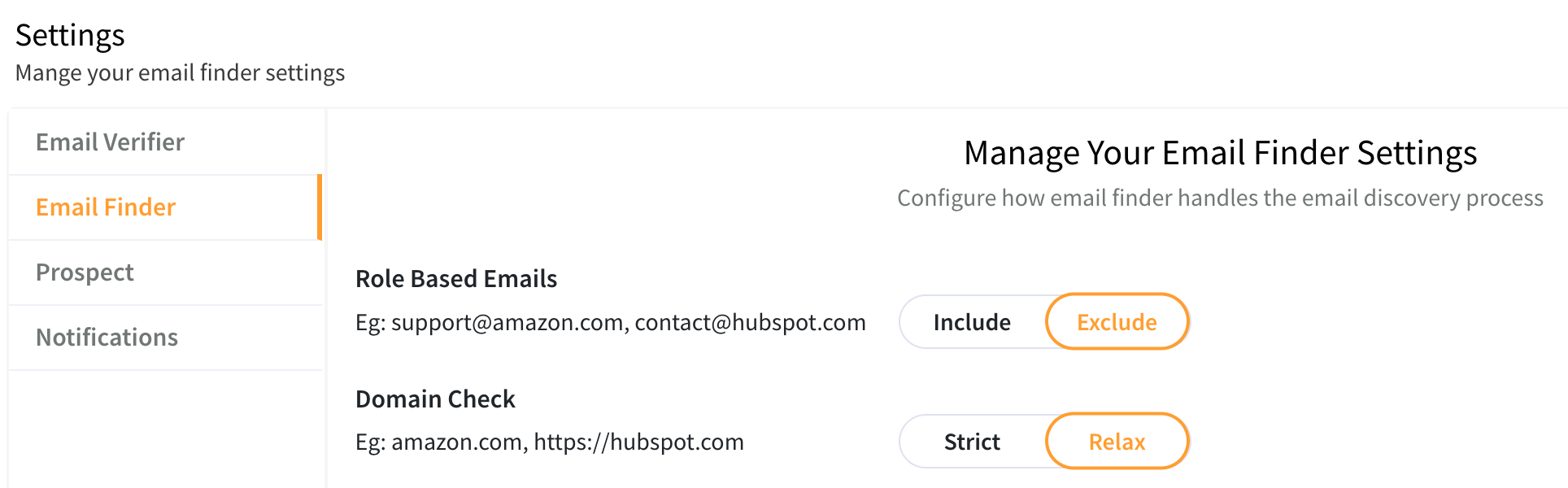
The Email Finder settings page lets users control how the email discovery process treats role-based addresses and domain formats.​

Accessing Email Finder settings

Manage Email Finder Settings

Role-Based Emails

Role-based emails are generic addresses that are not tied to a specific person, for example, [email protected] or [email protected].​

  • Include:

    • Email Finder is allowed to return role-based email addresses when a professional address cannot be found.​

    • Use this when generic inboxes are acceptable for your outreach or workflows.​

  • Exclude (default):

    • Email Finder will skip role-based email addresses and only return person-based addresses where possible.​

    • Use this when your use case requires direct, individual contacts and you want to avoid generic team or department inboxes.​

To update this behavior, select the desired option under Role Based Emails and your preference is saved for subsequent searches.​

Domain Check

Domain check controls how strictly Email Finder interprets and validates the domain input when supplied values as company name and Website URL​

  • Strict:

    • Use only the Domain/Website URL field; even if a company name is present, Clearout will exclusively rely on the domain for finding emails.

    • If a domain is missing in bulk uploads or API requests, the request will not be processed to prevent inaccurate results.

    • Helps match emails with verified company domains, avoiding incorrect email retrieval.

  • Relax (default):

    • Accepts more flexible domain forms (for example, URLs with protocols) and attempts to normalize them before performing the search or if the company name is provided, the system will try to resolve the equivalent domain.

    • Recommended when importing mixed data from various sources where domains may include Website URL, domain names without protocol, or the company names.​

Choose Strict or Relax under Domain Check to align the Email Finder with the quality and structure of your domain inputs.

How It Works Across Different Email Finder Modes

Bulk Email Finder:

  • The uploaded file must contain a website/domain column.

  • If the file lacks a domain column, it will be rejected to ensure accuracy.

Instant Email Finder (Single Lookup):

  • A domain input is mandatory when this setting is enabled.

  • If only a company name is provided without a domain, the request will be declined to prevent mismatches.

Credit charge

Clearout follows a transparent credit usage model.

  • 4 credits are charged for a non-role based email address, and 2 credits are charged for a role-based email address.

  • No credits are charged when the result shows email not found.

  • In Bulk Finder, exact duplicate entries are not charged.

This ensures predictable usage and cost control at scale. Click herearrow-up-right to know the credit charges in detail.

Supported Integrations

Clearout integrates seamlessly into your existing tech stack.

API

  • Real-time and bulk finding endpoints

  • Built for scale and automation

  • Secure and reliable

Last updated

Was this helpful?