> For the complete documentation index, see [llms.txt](https://docs.clearout.io/llms.txt). Markdown versions of documentation pages are available by appending `.md` to page URLs; this page is available as [Markdown](https://docs.clearout.io/form-guard/email-field-validation.md).
# Email Field Validation
Validate email fields on web forms live
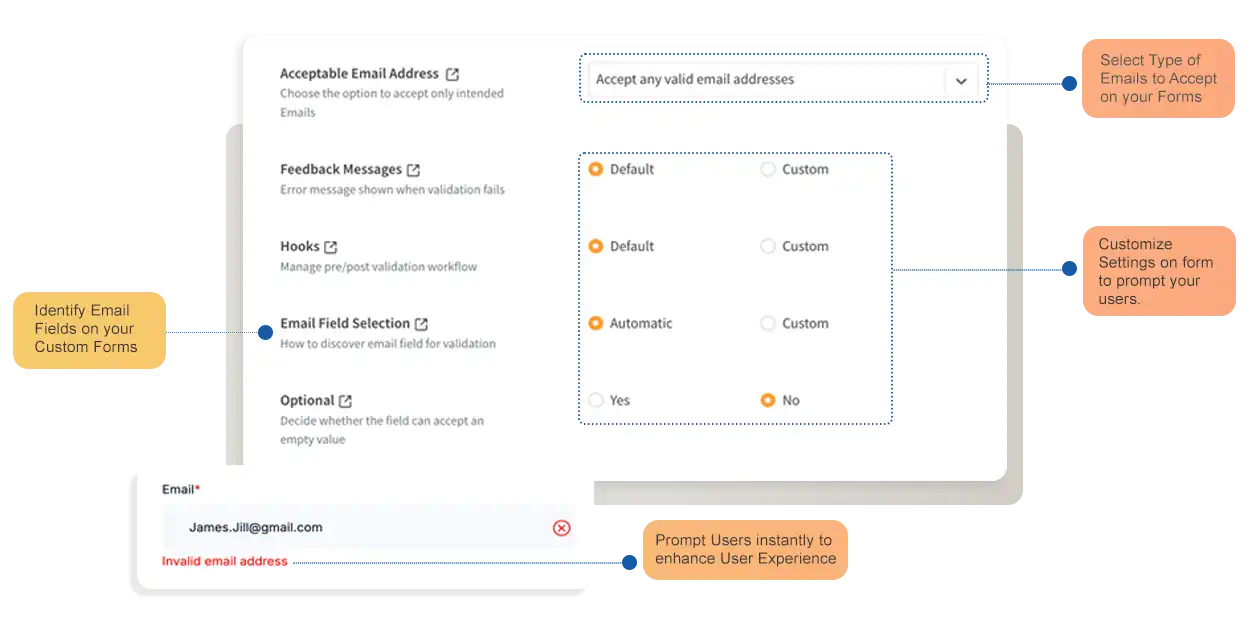
The Form Guard provides a **flexible and powerful email validation component** that allows you to configure how Clearout should validate email addresses based on your specific requirements. This section covers the various field setting options available to customize the email validation behavior.
## Email Field Setting Options
Find below the various **email field setting options** that can be configured as part of the Guard creation or by using the customized code
Customize how email fields are validated on your forms.
### Acceptable Values
* **Accept any Valid email address (default):** Allows any email address with a valid mailbox, including roles and gibberish accounts, and blocks disposable accounts.
* **Accept only Business and Personal email address:** Allows only valid business and personal email addresses, blocking role and gibberish accounts
* **Accept only Business email address:** Allows only valid business email addresses, blocking free accounts such as gmail.com, yahoo.com, hotmail and role-based accounts
* **Accept only Safe To Send email address:** Allows only email addresses with valid mailboxes of non-role, non-disposable, and non-catchall domains [**Learn more about Safe To Send**](https://docs.clearout.io/email-verifier/overview#safe_to_send)
* **Custom**: Allows you to set your own custom validation rules for email addresses
* **Safe To Send Only**: Allowing email that Clearout validation claims is guaranteed to be delivered without a bounce
* **Block Role Account**: Prevent form submission if the email is a role-based address (e.g., admin@, support@, info@)
* **Block Free Account**: Block form submission for emails from free providers like Gmail, Yahoo, or Outlook
* **Block disposable account**: Block form submission if the email is from a disposable or temporary email provider.
* **Block Gibberish Account**: Block emails identified as gibberish or invalid, preventing submission of nonsensical or fabricated addresses
* **Block Unknown status**: Block form submission if the email status could not be determined by Clearout validation
* **Block Catchall Status**: Block form submission for emails with a catch-all status, where the mailbox accepts all addresses regardless of existence
* **Block form submission on timeout**: Block form submission if the email validation request times out
* **Block form submission on usage limit crossed**: Block form submission when email validation usage limit is exceeded.
### Feedback Messages
This option allows you to customize the feedback (error) messages displayed on forms when an invalid or unacceptable value is entered in the email field.
* **Default:** A predefined set of feedback messages automatically set by the Form Guard.
* **Custom:** Displays all possible feedback message variations for the email field, with their default values shown as placeholder text in the input field.
## Hooks
This option allows you to define custom JavaScript functions that execute either before or after Clearout's form validation.
### **On Before Verify**
This hook is triggered just before Clearout's email validation runs. The function receives two destructured parameters as defined below:
* **email**: The value entered in the respective form field.
* **$form**: The jQuery-wrapped form element.
The function should return an object with is\_acceptable and error\_msg properties. Setting is\_acceptable to false will consider the input value as invalid with the message set on the error\_msg property.
* **is\_acceptable**: The validation status of the On Before Verify hook.
* **error\_msg**: The HTML error message string to be displayed in case of is\_acceptable is false.
```javascript
on_before_verify: function({ email, $form }) {
let response = { is_acceptable: true, error_msg: '' };
// Custom validation logic goes here
if (email.includes('example.com')) {
response.is_acceptable = false; // Set is acceptable to false to prevent form submission
response.error_msg = 'Example domain email are not allowed !!';
}
return response;
}
```
### **On After Verify**
This hook is triggered just after Clearout's email validation runs, and it has returned with Clearout's validation response. The function receives three destructured params:
* **email**: The value entered in the respective form field
* **$form**: The jQuery-wrapped form element
* **result**: The Clearout's Validation result object
The function should return an object with is\_acceptable and error\_msg properties. Setting is\_acceptable to false will consider the input value as invalid with message set on error\_msg property.
* **is\_acceptable**: The validation status of the On After Verify hook.
* **error\_msg**: The HTML error message string to be displayed in case of is\_acceptable is false.
```javascript
on_after_verify: function({ email, $form, result }) {
let response = { is_acceptable: true, error_msg: '' };
// Custom validation logic goes here
console.log(result);
return response;
}
```
## Field Selection
This option lets you choose whether Clearout's Form Guard should automatically detect and attach validation to email fields or apply validation only to specific fields of your choice.
By default, the **Automatic** mode is enabled, allowing Clearout to identify form fields based on various techniques:
* Element's **type** is **email.**
* Element's name is equal to any one of **email**, **email\_address**, **clearout-email**
* Element has attribute **data-clearout-email-field**
* Element's placeholder text is any one of **Enter your email address, Your email address, work email**
When **Custom** mode is selected, you can manually specify the exact **email field** you want Form Guard to validate by providing a custom selector.
* **Targeting via Selector**: Enter a valid jQuery selector that targets your specific email input element (for example, `[name='Email_Input']`, `#email_input`, or `.user-email`).
{% hint style="info" %}
**When to use Custom option?**[ ](#user-content-fn-1)[^1]
If your form uses custom field names, non-standard HTML attributes, or if you want precise control by targeting only specific input fields using a jQuery selector instead of automatic detection
{% endhint %}
## Optional Fields
In case the email input field is set as optional, without requiring the visitor to fill it, then you can set this option to **"Yes."**
Here's how it works:
* **If the field is left empty**: The form submission will proceed without validation for that field.
* **If the field is filled**: Even though it's optional, the entered value will be validated. The form will only be allowed to submit if the value passes validation based on your configured criteria.
## Testing
For testing purposes, you can use the [test email addresses](/developers/api/overview.md#testing) to verify different validation scenarios without incurring any credit cost.
[^1]:
---
# Agent Instructions
This documentation is published with GitBook. GitBook is the documentation platform designed so that both humans and AI agents can read, navigate, and reason over technical content effectively. Learn more at gitbook.com.
## Querying This Documentation
If you need additional information that is not directly available in this page, you can query the documentation by asking a question.
Perform an HTTP GET request on the following URL with the `ask` and `goal` query parameters:
```
GET https://docs.clearout.io/form-guard/email-field-validation.md?ask=&goal=
```
`ask` is the immediate question: it should be specific, self-contained, and written in natural language.
`goal` is what the user is ultimately trying to achieve, the reason they need the answer. Sharing it helps GitBook give you a better, more relevant answer. A goal is most helpful when it describes the outcome the user wants rather than restating the question. For example, with `ask=how do I create an API token`, a goal like `automate deployments from our CI pipeline` lets GitBook tailor the answer to that use case.
The response will contain a direct answer to the question and relevant excerpts and sources from the documentation.
Use this mechanism when the answer is not explicitly present in the current page, you need clarification or additional context, or you want to retrieve related documentation sections.