# Overview

The Clearout **Form Guard** facilitates seamless real-time field validations on forms. Form Guard allows you to quickly collect all valid leads while visitors fill out forms, helping to prevent missed chances and stopping fake leads from getting into your **CRM** (Customer Relationship Management system) and keeping setup easy even for **non-developers**.&#x20;

<div data-with-frame="true"><figure><img src="https://93738666-files.gitbook.io/~/files/v0/b/gitbook-x-prod.appspot.com/o/spaces%2FEXQQW0hsXyH0YD4ePoxb%2Fuploads%2FbXK2PWyl5lAsJ9L0p6UR%2Fall_3_fields.gif?alt=media&#x26;token=f0143919-a47c-434f-a3b1-dd39d301dcde" alt="Overview of Form Guard Real-Time Validation on Name, Phone number and Email address" width="362"><figcaption><p>Form Guard in Action. <a href="https://youtu.be/5T7ZalNoLFw?si=yYNqQhJTegxHl05S">Video version</a> </p></figcaption></figure></div>

## Supported Form Field Validators <a href="#supported-form-field-validators" id="supported-form-field-validators"></a>

<table><thead><tr><th width="174.9296875">Form Fields</th><th>Description</th></tr></thead><tbody><tr><td><a href="email-field-validation"><strong>Email</strong></a></td><td>Validates email addresses for deliverability status and identifies business, disposable, role, and gibberish addresses.</td></tr><tr><td><a href="phone-field-validation"><strong>Phone</strong></a></td><td>Validates phone numbers of all types for correct format, length, and structure.</td></tr><tr><td><a href="name-field-validation"><strong>Name</strong></a></td><td>Validates a given name for profanity, gibberish, special characters, or numbers and disallows submission if found invalid.</td></tr></tbody></table>

## Create Your Form Guard

To create and configure a Form Guard, follow these steps using Clearout's Form Guard Creation Wizard:

{% stepper %}
{% step %}
Navigate to the [Form Guard](https://app.clearout.io/form-guard/lists).​
{% endstep %}

{% step %}
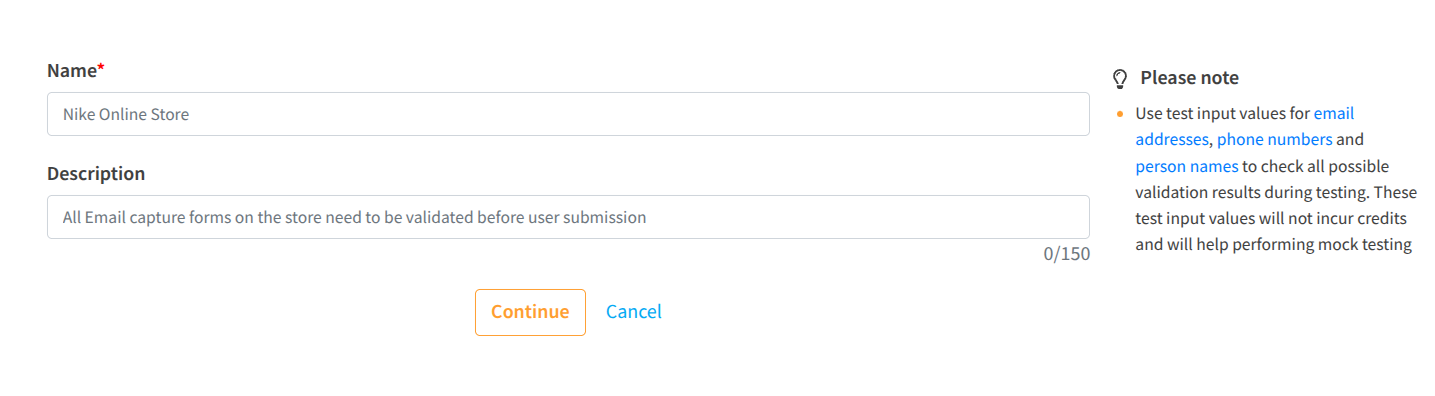
Click on Create Guard

<div data-with-frame="true"><figure><img src="https://93738666-files.gitbook.io/~/files/v0/b/gitbook-x-prod.appspot.com/o/spaces%2FEXQQW0hsXyH0YD4ePoxb%2Fuploads%2FszqbgR48azKXkE7gPWy6%2Fformguard_app_create.png?alt=media&#x26;token=03b8e7e2-0061-498a-a7f0-51ad3c26422b" alt="Create Guard" width="563"><figcaption></figcaption></figure></div>

You can provide the guard a meaningful name and description. This will reveal credit usage across guards. It also lets you categorize lead sources by guard name to see activity breakdown on the [activities](https://app.clearout.io/activities) page.
{% endstep %}

{% step %}
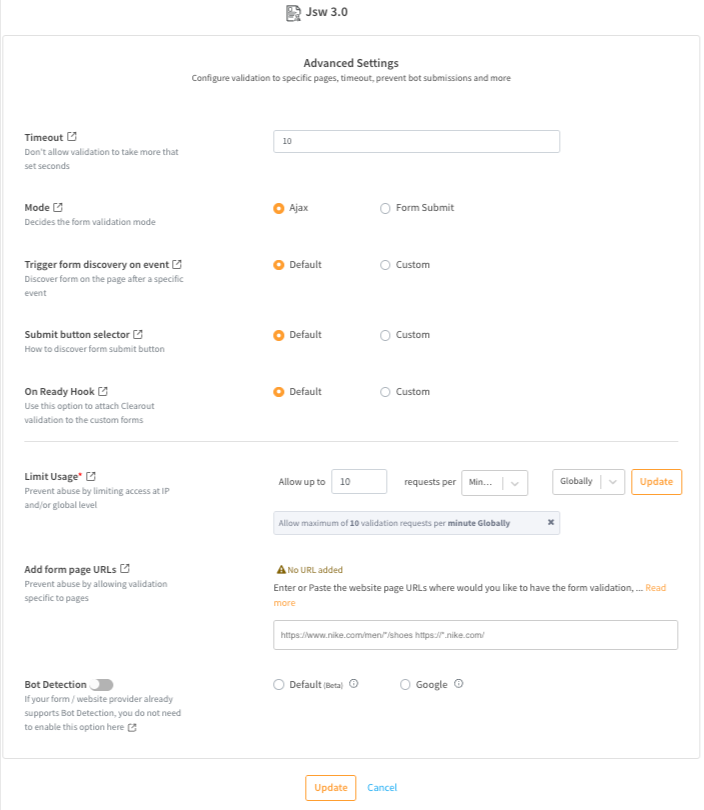
Follow the step-by-step wizard to configure your Form Guard

Here, you can decide which of your form's fields need to be validated. You can also take into account advanced settings to stop submissions that are fake or from bots.

<figure><img src="https://93738666-files.gitbook.io/~/files/v0/b/gitbook-x-prod.appspot.com/o/spaces%2FEXQQW0hsXyH0YD4ePoxb%2Fuploads%2FkIk6iYSuHprnqZDSaxeD%2Fimage.png?alt=media&#x26;token=6c90b220-f197-4b0e-b0a4-0f0ff529e70e" alt="Configure Form Guard Settings for Name, Phone Number and Email Validation" width="528"><figcaption></figcaption></figure>
{% endstep %}

{% step %}
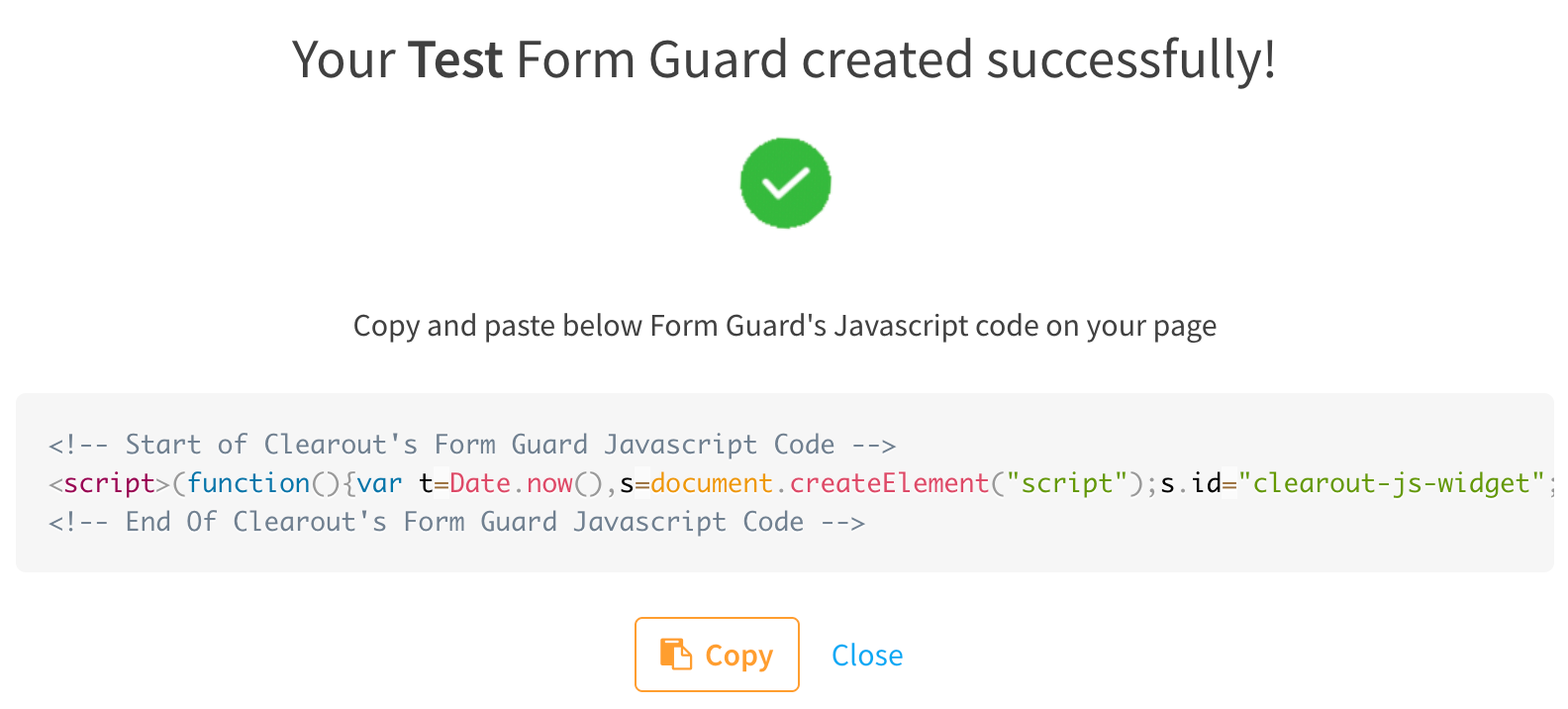
Generate a Form Guard code snippet.&#x20;

Once you configure the field-level validation and advanced settings, Form Guard will produce a JavaScript code snippet that you can embed into your form. This code snippet will validate each form input in real time, preventing bad lead data from entering your CRM.&#x20;

<div data-with-frame="true"><figure><img src="https://93738666-files.gitbook.io/~/files/v0/b/gitbook-x-prod.appspot.com/o/spaces%2FEXQQW0hsXyH0YD4ePoxb%2Fuploads%2FIdgwL1txSKGPlzppFqDI%2Fco-fg-success.png?alt=media&#x26;token=e57e184c-3035-4bd0-8a0c-04bebbc456ef" alt="Generate a Form Guard code snippet and Copy to validate on Forms" width="563"><figcaption></figcaption></figure></div>
{% endstep %}
{% endstepper %}

## Form Guard Live Demos <a href="#form-guard-live-demos" id="form-guard-live-demos"></a>

Use the **live demos** to see Form Guard in action on **HubSpot**, **Unbounce**, and **Leadpages** forms, and test how real-time validation behaves with valid, invalid, disposable, and gibberish email entries. This lets you preview the exact inline error messages and blocked submissions your visitors will see before deploying Form Guard on your forms.

<table><thead><tr><th width="212.68359375">Form Provider + Form Guard</th><th>What it shows</th></tr></thead><tbody><tr><td>HubSpot + Form Guard </td><td>Inline email, phone, and name validation checks on a HubSpot landing page form.​<br><a href="https://datacept-technologies-private-limited-47097729.hubspotpagebuilder.net/co-js-widget-3.0">Try Live Demo</a> </td></tr><tr><td>Unbounce + Form Guard </td><td>Real-time validation on a high-conversion Unbounce page​<br><a href="https://clearout.io/formguard/v3/demos/unbounce.html">Try Live Demo</a></td></tr><tr><td>Leadpages + Form Guard </td><td>Email verification on Leadpages opt-in and signup forms<br><a href="https://clearout.io/formguard/v3/demos/leadpages.html">Try Live Demo</a>​</td></tr></tbody></table>

{% hint style="info" %}
**Did you know?**&#x20;

* The **default configurations in the setup wizard will suffice** for the majority of standard web forms to enable real-time validation support.
* Changes to the **Form Guard settings take effect right away**. You **don't need to re-embed the code** snippet. (Don't forget to refresh the page to see the changes.)
* If you don't use Google reCaptcha, you can **turn on built-in bot detection**. <br>
  {% endhint %}