> For the complete documentation index, see [llms.txt](https://docs.clearout.io/llms.txt). Markdown versions of documentation pages are available by appending `.md` to page URLs; this page is available as [Markdown](https://docs.clearout.io/integrations/automation/make.md).
# Make
Integrate Clearout with Make for automated email verification and finding
**Make** is a visual automation platform that lets you build multi-step workflows between Clearout and almost any online service, without writing code. You can use it to automate tasks such as email verification and email discovery whenever data moves between your forms, CRMs, spreadsheets, and other tools.
## What Clearout Can Do in the Make
Clearout works with [Make](https://www.make.com/en/integrations/clearout) to provide you powerful email-related actions that you can use in your workflows. The two main actions you can do are
**1. Verify Email Address**
**2. Find Email Address**
These actions help you keep your data accurate and make outreach easier.
> We'll show you how to use Clearout's Verify Email Address action with Google Sheets in the steps below. You can do the same things for other Clearout actions.
## Setup Clearout on Make
{% stepper %}
{% step %}
### Create a new scenario
* **Log in** to your Make account.
* Click **Create a new scenario** to start building your workflow.
{% endstep %}
{% step %}
### Set Up & Test Trigger Connection
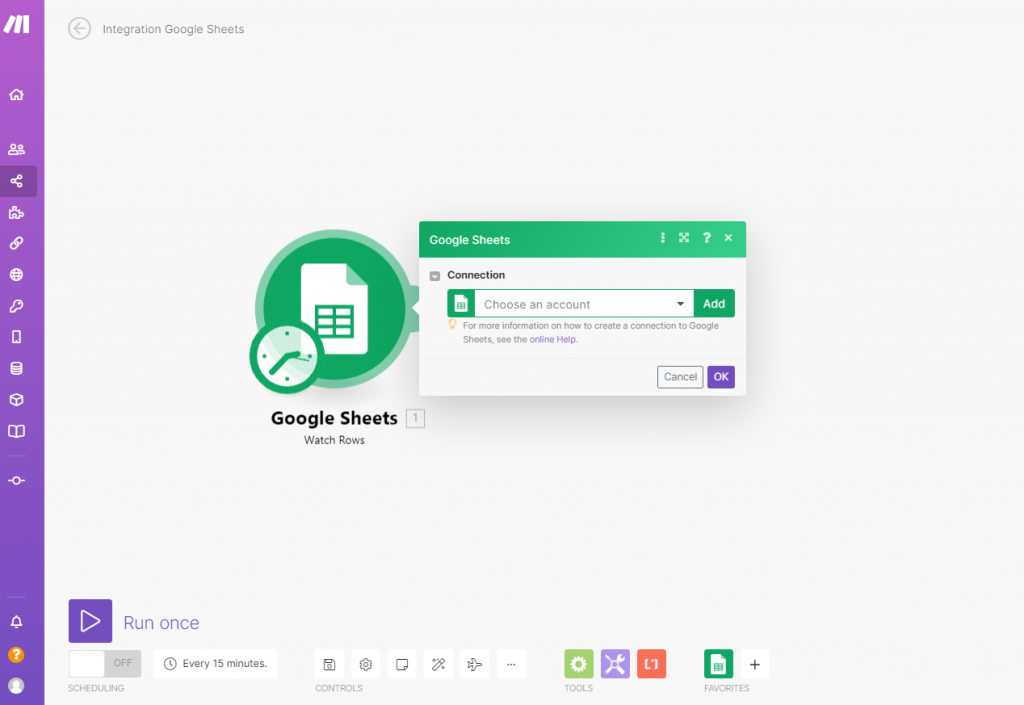
Every scenario starts with a module (connector) that triggers the workflow. For example, using **Google Sheets**:
* Add **Google Sheets** as the first module.
* Connect your Google account to Make.
* Select the spreadsheet file and worksheet that contains the email addresses, then click **OK** to proceed.
**To test the trigger**- click Run once in Make and then perform the trigger action by adding a new row in Google Sheets or updating an existing row, depending on your trigger type. The scenario will execute automatically and capture the trigger data. You can use other trigger apps (such as forms or CRM tools) in the same way.
{% endstep %}
{% step %}
### Add Clearout Action
After configuring your trigger:
* Click **+** icon to add a new module
* Search for **Clearout** and select it
* Choose **Verify Email Address**
* Click **OK**
{% endstep %}
{% step %}
### Connect Your Clearout Account
After selecting the Clearout action:
* Click **Add** to create a new connection.
* Paste your Clearout API Token when prompted
**Generate your API Token:**
* **Log in** to your Clearout Account.
* Go to [**Developer → API**](https://app.clearout.io/developer/api/list).
* Click **Create API Token** to generate a new token.
* Copy the token and paste it into the **Create a connection** popup in Make, then save.
{% endstep %}
{% step %}
### Test Google Sheets Workflow
**Example Workflow**
Using Google Sheets as the trigger:
* **Trigger:** New email added in Google Sheets
* **Action:** Clearout → Verify Email Address or Find Email Address
* **Result:** Output (verification status or found email) is updated back in the sheet
**Test the Scenario**
After all modules are configured:
1. Click **Run once** in Make to test the scenario.
2. Check the Clearout module output to view the results for each processed record.
From here, you can add more modules (filters, routers, CRM updates, notifications) to route data based on your workflow logic and fully **automate your process with Clearout and Make.**
View a sample scenario in [Make](https://www.make.com/en/templates/4330-watch-google-sheets-records-and-verify-emails-using-clearout)
{% endstep %}
{% endstepper %}
---
# Agent Instructions
This documentation is published with GitBook. GitBook is the documentation platform designed so that both humans and AI agents can read, navigate, and reason over technical content effectively. Learn more at gitbook.com.
## Querying This Documentation
If you need additional information that is not directly available in this page, you can query the documentation by asking a question.
Perform an HTTP GET request on the following URL with the `ask` and `goal` query parameters:
```
GET https://docs.clearout.io/integrations/automation/make.md?ask=&goal=
```
`ask` is the immediate question: it should be specific, self-contained, and written in natural language.
`goal` is what the user is ultimately trying to achieve, the reason they need the answer. Sharing it helps GitBook give you a better, more relevant answer. A goal is most helpful when it describes the outcome the user wants rather than restating the question. For example, with `ask=how do I create an API token`, a goal like `automate deployments from our CI pipeline` lets GitBook tailor the answer to that use case.
The response will contain a direct answer to the question and relevant excerpts and sources from the documentation.
Use this mechanism when the answer is not explicitly present in the current page, you need clarification or additional context, or you want to retrieve related documentation sections.