> For the complete documentation index, see [llms.txt](https://docs.clearout.io/llms.txt). Markdown versions of documentation pages are available by appending `.md` to page URLs; this page is available as [Markdown](https://docs.clearout.io/integrations/crm/zoho.md).
# Zoho
Integrate Clearout with Zoho CRM for email verification and list cleaning
Zoho CRM makes it easy to manage customer data, but if your contact lists are filled with invalid or risky email addresses, your Zoho campaigns are bound to suffer.
That's where Clearout steps in.
**Clearout's native integration with Zoho CRM allows you to verify your contact** and lead lists directly - no exports, no spreadsheets. Simply connect, clean, and continue sending with confidence.
* **Real-time detection** of invalid, disposable, role-based, or risky emails
* **Fully synced** with Zoho CRM contact lists
* **Easy export of cleaned lists** with flexible options
## How to Set Up the Clearout–Zoho CRM Integration in a Few Steps
The Clearout integration works via Zoho CRM, allowing you to:
* Connect your Zoho CRM account to Clearout
* Pull in Leads and Contacts lists created for Campaigns
* Verify the selected campaign lists directly in Clearout
* Export cleaned results back to Zoho CRM or download for further use
{% embed url="" %}
## How the Zoho Integration Works
{% stepper %}
{% step %}
### Connect your Zoho CRM account to Clearout
* **Log in** to your Clearout account
* Go to the **Integrations** section
* Select **Zoho**
* Click '**Add Account**'
* A pop-up will prompt you to **authorize Clearout** with Zoho CRM
* Once authorized, your Zoho CRM campaign lists will be ready to import and verify
{% endstep %}
{% step %}
### Import Your Contact or Lead Lists
* Once connected, you can choose from your Zoho Campaigns Lead or Contact lists
* **Select the list(s)** you wish to clean and click “**Add to My List**”.
{% endstep %}
{% step %}
### Start the Verification
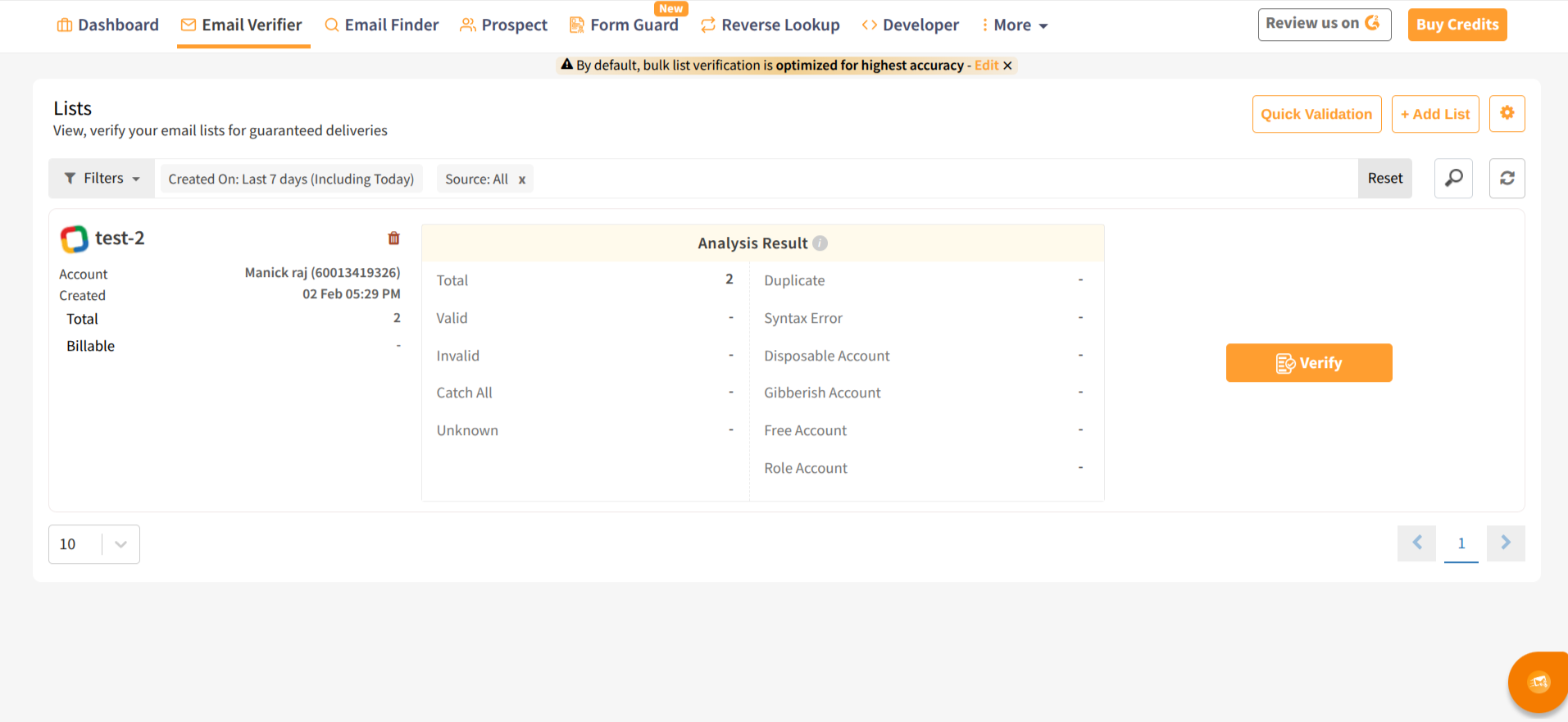
* After importing, hit '**Verify**'
* Clearout performs **20+ advanced checks**, ensuring 99% accuracy
* Disposable, spam trap, catch-all, syntax errors, and inactive emails are all flagged
{% endstep %}
{% step %}
### Export the Clean List
After the validation is complete, the user can download the results in CSV format or export them directly to their Zoho CRM.
The user can export the results by selecting "**unsubscribe**," "**append**," or **both**.
* **Unsubscribe:** Select this option to remove all the non-deliverable (invalid) email addresses on the Zoho CRM automatically.
* **Append:** Select this option to append the Clearout standard columns to Zoho CRM.
This ensures your email list remains accurate, your reputation intact, and your Zoho CRM is clean.
{% endstep %}
{% endstepper %}
### Frequently Asked Questions
Does this integration work with Zoho CRM or Zoho Campaigns?
The integration connects through **Zoho CRM**, allowing you to import Campaign **Lead** and **Contact** lists created within campaigns. These are synced from your Zoho CRM account.
Can I verify both Leads and Contacts?
Yes! Once connected, Clearout will allow you to import and verify both types of campaign lists, depending on how you organize your data in Zoho Campaigns.
Will Clearout remove or delete any of my contacts?
No. You’ll always have control over what happens to your data. Once verification is complete, you can choose to:
* Mark invalid emails for unsubscribing
* Append verification status to each contact
* Export the cleaned data for manual review.
How accurate is the email verification process?
Clearout offers **99% accuracy**, running 20+ validation checks on every email address—including syntax validation, MX record checks (which verify the mail server for the domain), catch-all detection (identifying domains that accept emails for any address), and spam trap detection (finding email addresses used to catch spammers).
How are credits consumed for Zoho list verification?
Each email address verified consumes **1 credit**. You can [view pricing here](https://app.clearout.io/pricing?utm_source=chatgpt.com\&utm_referrer=https%3A%2F%2Fwww.google.com%2F) or get started with 100 free credits.
Can I integrate this with Zoho Forms or Web Forms?
Currently, the native integration works through Zoho CRM. If you’d like to implement real-time verification on forms, you can use the [Form Guard](/form-guard/overview.md) or [API](/developers/api/email-verify.md#post-email_verify-instant)
Is technical assistance available during setup?
Yes, we’re happy to help! You can contact our support team anytime via [Live Chat](https://clearout.io/contact-us/) or schedule a walkthrough with a Clearout specialist.
---
# Agent Instructions
This documentation is published with GitBook. GitBook is the documentation platform designed so that both humans and AI agents can read, navigate, and reason over technical content effectively. Learn more at gitbook.com.
## Querying This Documentation
If you need additional information that is not directly available in this page, you can query the documentation by asking a question.
Perform an HTTP GET request on the following URL with the `ask` and `goal` query parameters:
```
GET https://docs.clearout.io/integrations/crm/zoho.md?ask=&goal=
```
`ask` is the immediate question: it should be specific, self-contained, and written in natural language.
`goal` is what the user is ultimately trying to achieve, the reason they need the answer. Sharing it helps GitBook give you a better, more relevant answer. A goal is most helpful when it describes the outcome the user wants rather than restating the question. For example, with `ask=how do I create an API token`, a goal like `automate deployments from our CI pipeline` lets GitBook tailor the answer to that use case.
The response will contain a direct answer to the question and relevant excerpts and sources from the documentation.
Use this mechanism when the answer is not explicitly present in the current page, you need clarification or additional context, or you want to retrieve related documentation sections.