> For the complete documentation index, see [llms.txt](https://docs.clearout.io/llms.txt). Markdown versions of documentation pages are available by appending `.md` to page URLs; this page is available as [Markdown](https://docs.clearout.io/integrations/esp/activecampaign.md).
# ActiveCampaign
Integrate Clearout with ActiveCampaign to verify and clean email lists
Reduce bounce rates, boost deliverability, and be confident your emails are landing in inboxes. This Clearout integration of **email verification with ActiveCampaign helps ensure that invalid and fake email addresses** are filtered out from your list before you hit send. Securely import/export data between the two platforms using the integration.
{% hint style="info" %}
**Note**:\
\
Want to Automatically Validate Emails When Contacts Are Subscribed to an ActiveCampaign List?\
\
You can easily automate this using the ActiveCampaign Automation Workflow in combination with the Clearout App. By setting this up, every new contact added to your ActiveCampaign list will be automatically validated by Clearout in real-time. The results will be instantly mapped to the respective Clearout status fields within your contact profile.\
\
👉 [Watch the step-by-step demo](https://www.loom.com/share/1812ab44ee744cb9ae729cce2b4e5e80) to learn how to deploy this automation in just a few clicks.
{% endhint %}
## How It Works:
{% stepper %}
{% step %}
### Connect account
After logging in to your Clearout account, go to the Integration page and select ActiveCampaign.
Click on "**Add Account**" to add your Active Campaign account.
A pop-up will be displayed, asking for the **URL, key, and account name**. You can find these details in your Active Campaign account under the "**Developer**" tab in Settings.
Once you feed in the URL and Key details in Clearout, click on the "**Add Account**" button.
{% endstep %}
{% step %}
### Add the email lists
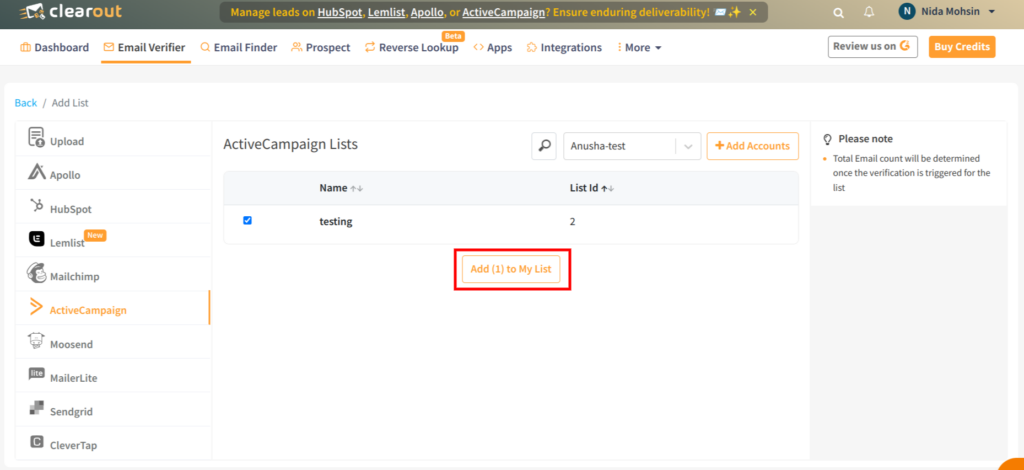
Keep the email address lists clean by easily adding them from the ActiveCampaign account.\
\
After the successful login, **select the email list(s)** from the existing ActiveCampaign audience list. Then click on "**Add to My List**" to proceed with the audience list validations.
{% endstep %}
{% step %}
### Verify the email address list
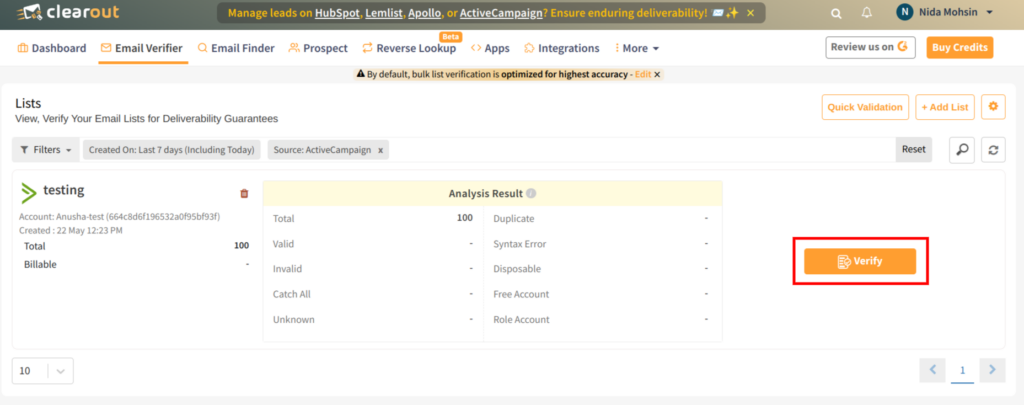
Once the audience list is successfully added, click on "**Verify**" to start validating the added ActiveCampaign list.
{% endstep %}
{% step %}
#### Export the verified results
Once the validation is completed, the user can choose how to export the verified list to the ActiveCampaign account. The user can export the result by choosing to unsubscribe, append, or otherwise select both.\
\
**Unsubscribe**: By choosing this option, you can unsubscribe the invalid/non-deliverable email addresses on the ActiveCampaign list automatically, which removes all the non-deliverables from the mailing list.\
\
**Append**: By choosing this option, you can export the result and append the Clearout columns with the original file in the ActiveCampaign account.
{% endstep %}
{% step %}
### Getting an error exporting the result file? Try the manual upload option
One of the challenges that has been reported by ActiveCampaign users is that they face difficulty in exporting the result file back to ActiveCampaign after validating it in Clearout. \
\
We are here with an alternate way to **help users during such temporary downtime from ActiveCampaign.**
{% embed url="" %}
{% endstep %}
{% endstepper %}
---
# Agent Instructions
This documentation is published with GitBook. GitBook is the documentation platform designed so that both humans and AI agents can read, navigate, and reason over technical content effectively. Learn more at gitbook.com.
## Querying This Documentation
If you need additional information that is not directly available in this page, you can query the documentation by asking a question.
Perform an HTTP GET request on the following URL with the `ask` and `goal` query parameters:
```
GET https://docs.clearout.io/integrations/esp/activecampaign.md?ask=&goal=
```
`ask` is the immediate question: it should be specific, self-contained, and written in natural language.
`goal` is what the user is ultimately trying to achieve, the reason they need the answer. Sharing it helps GitBook give you a better, more relevant answer. A goal is most helpful when it describes the outcome the user wants rather than restating the question. For example, with `ask=how do I create an API token`, a goal like `automate deployments from our CI pipeline` lets GitBook tailor the answer to that use case.
The response will contain a direct answer to the question and relevant excerpts and sources from the documentation.
Use this mechanism when the answer is not explicitly present in the current page, you need clarification or additional context, or you want to retrieve related documentation sections.