> For the complete documentation index, see [llms.txt](https://docs.clearout.io/llms.txt). Markdown versions of documentation pages are available by appending `.md` to page URLs; this page is available as [Markdown](https://docs.clearout.io/integrations/esp/skylead.md).
# Skylead
Integrate Clearout with Skylead to verify and clean campaign lists
This Clearout integration of **email verification with Skylead helps ensure that invalid and fake email addresses are blocked** before they get added to the Campaign list.
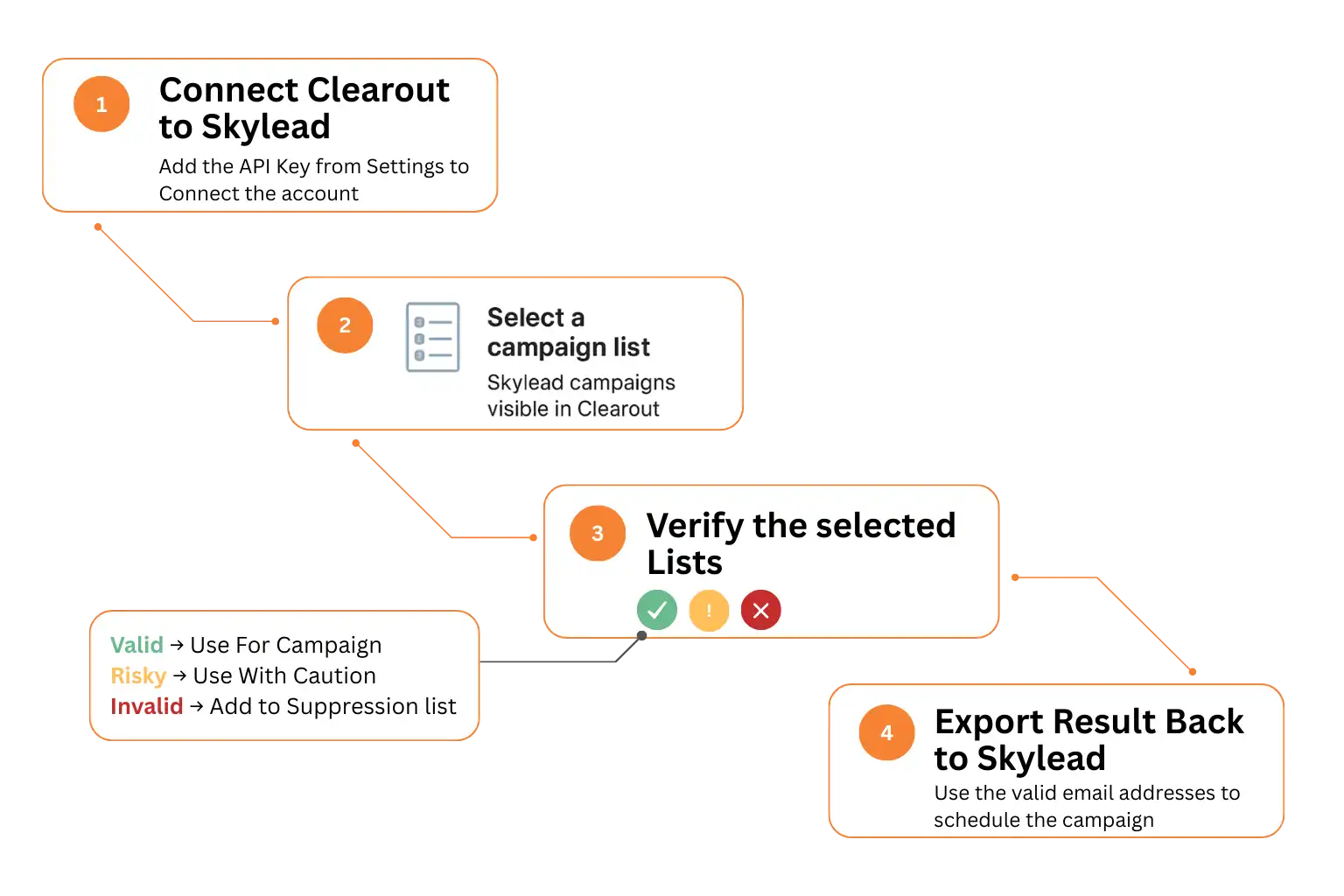
Before diving into the setup instructions, watch the flow below to understand how the integration works from start to finish. This will make it easier for you to follow along and get started within minutes.
{% stepper %}
{% step %}
### Connect account
* **Log in** to your Clearout account.
* Go to **Integrations** → Skylead → Connect.
* Enter your **Skylead API key** (found in Skylead **→** Accounts **→** Account Settings **→** Your API Key) to **authorize the connection**.
{% endstep %}
{% step %}
### Select Campaign List
After connecting, your Skylead **campaign lists** will appear automatically in Clearout. **Select the campaign list(s)** you wish to validate.
{% endstep %}
{% step %}
### Verify Your List
Click "**Verify**" to start real-time validation. \
\
Clearout runs 20+ advanced checks to identify:
* Typos & syntax errors
* Disposable or temporary emails
* Bot or fake submissions
* Duplicate entries
* Invalid formats
{% endstep %}
{% step %}
### Export and Append validated results
Once validation is complete:
* **Download** the cleaned list in .CSV / .XLSX format
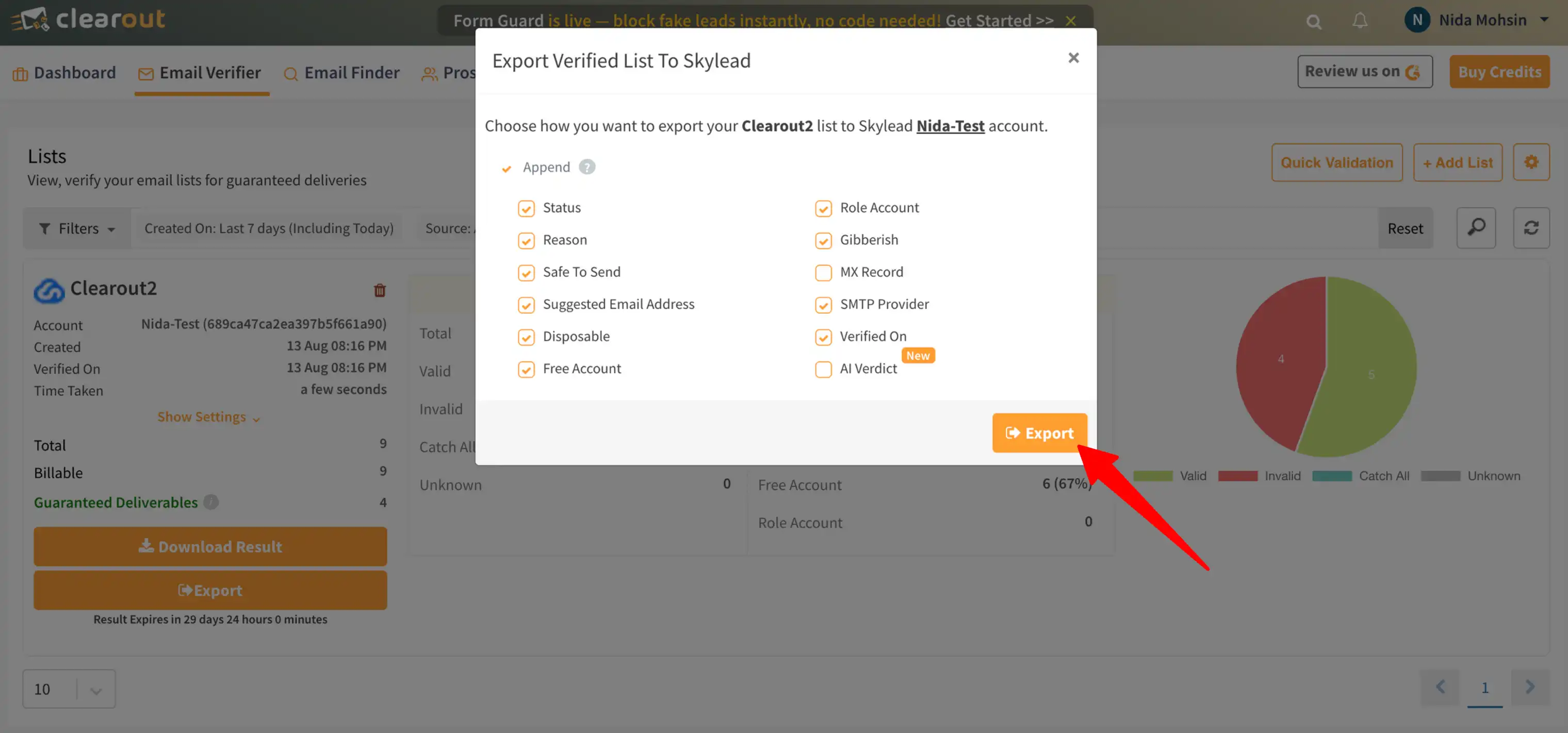
* Or **Export results** back to Skylead with a click
* You can **choose the columns** to be appended to your Skylead campaign list when exporting.
{% endstep %}
{% endstepper %}
## Frequently Asked Questions
Do I need a Skylead account to use this integration?
Yes, you’ll need an active Skylead account to connect with Clearout.
How do I get my Skylead API key?
In Skylead, go to Accounts -> Account Settings -> Your API Key and copy it into Clearout when prompted.
Can I validate multiple Skylead campaign lists at once?
You can validate lists based on your active plan. The trial account comes with validating individual lists at a time and repeating the process for other lists as needed.
What happens to invalid contacts after validation?
You can remove them from your targeting in Skylead or keep them marked as invalid for reference.
Does Clearout update Skylead lists automatically after validation?
No, after validation is completed, you can export results back directly to Skylead.
Will validation impact existing campaign performance?
Not directly, but removing invalid leads before launch significantly improves deliverability and engagement.
How accurate is the validation?
Clearout offers up to 99% accuracy in detecting invalid, risky, disposable, or any bad emails.
Is my data secure?
Yes, Clearout processes your data securely and complies with data protection regulations.
---
# Agent Instructions
This documentation is published with GitBook. GitBook is the documentation platform designed so that both humans and AI agents can read, navigate, and reason over technical content effectively. Learn more at gitbook.com.
## Querying This Documentation
If you need additional information that is not directly available in this page, you can query the documentation by asking a question.
Perform an HTTP GET request on the following URL with the `ask` and `goal` query parameters:
```
GET https://docs.clearout.io/integrations/esp/skylead.md?ask=&goal=
```
`ask` is the immediate question: it should be specific, self-contained, and written in natural language.
`goal` is what the user is ultimately trying to achieve, the reason they need the answer. Sharing it helps GitBook give you a better, more relevant answer. A goal is most helpful when it describes the outcome the user wants rather than restating the question. For example, with `ask=how do I create an API token`, a goal like `automate deployments from our CI pipeline` lets GitBook tailor the answer to that use case.
The response will contain a direct answer to the question and relevant excerpts and sources from the documentation.
Use this mechanism when the answer is not explicitly present in the current page, you need clarification or additional context, or you want to retrieve related documentation sections.