> For the complete documentation index, see [llms.txt](https://docs.clearout.io/llms.txt). Markdown versions of documentation pages are available by appending `.md` to page URLs; this page is available as [Markdown](https://docs.clearout.io/reverse-lookup/overview.md).
# Reverse Lookup Overview
Find verified contact details from email or LinkedIn
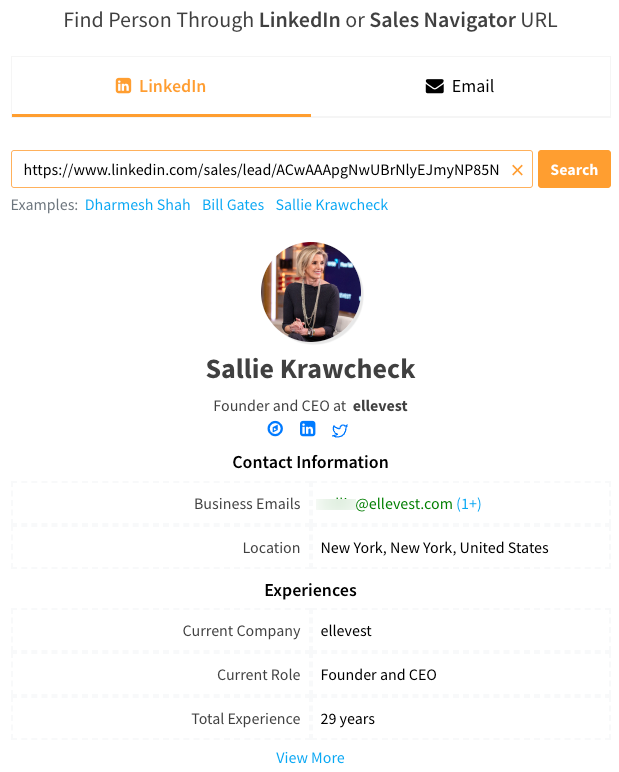
Clearout Reverse Lookup allows you to **search using a LinkedIn URL** or **email address** or **domain name** and uncover associated names, roles, companies, and social profiles. This is useful when you already have a touchpoint (profile or email or domain) and want to know who that person is before adding them to your prospecting or CRM workflows.
## Use Cases
| Feature | Key Use Cases | Primary Benefits |
| ------------------- | ----------------------------------------------------------------------- | ----------------------------------------------------------------- |
| **Email Lookup** | Inbound lead enrichment and scoring to identify high-value prospects. | Speeds up response times and enables hyper-personalized outreach. |
| **LinkedIn Lookup** | Extracting verified contact details directly from profiles or searches. | Reduces manual entry while maintaining high data accuracy. |
| **Domain Lookup** | B2B lead generation and identifying companies visiting the website. | Uncovers anonymous visitor intent and assists in ABM strategies. |
## How to get started
* Open the Clearout dashboard and go to the Reverse Lookup section from the main navigation.
* Choose whether you want to work with [Email Reverse Lookup](/reverse-lookup/email-reverse-lookup.md), [LinkedIn Reverse Lookup](/reverse-lookup/linkedin-reverse-lookup.md), or [Domain Reverse Lookup](/reverse-lookup/domain-reverse-lookup.md) based on the data you have.
* Paste your input (email addresses or LinkedIn profile URLs) into the lookup box and start the search to retrieve enriched contact details.
---
# Agent Instructions
This documentation is published with GitBook. GitBook is the documentation platform designed so that both humans and AI agents can read, navigate, and reason over technical content effectively. Learn more at gitbook.com.
## Querying This Documentation
If you need additional information that is not directly available in this page, you can query the documentation by asking a question.
Perform an HTTP GET request on the following URL with the `ask` and `goal` query parameters:
```
GET https://docs.clearout.io/reverse-lookup/overview.md?ask=&goal=
```
`ask` is the immediate question: it should be specific, self-contained, and written in natural language.
`goal` is what the user is ultimately trying to achieve, the reason they need the answer. Sharing it helps GitBook give you a better, more relevant answer. A goal is most helpful when it describes the outcome the user wants rather than restating the question. For example, with `ask=how do I create an API token`, a goal like `automate deployments from our CI pipeline` lets GitBook tailor the answer to that use case.
The response will contain a direct answer to the question and relevant excerpts and sources from the documentation.
Use this mechanism when the answer is not explicitly present in the current page, you need clarification or additional context, or you want to retrieve related documentation sections.