# Quick Validation

Quick Validation lets you verify one or more email addresses directly from the Clearout dashboard. It is designed for quick checks before adding contacts to your CRM or sending smaller campaigns.

<div data-with-frame="true"><figure><img src="https://93738666-files.gitbook.io/~/files/v0/b/gitbook-x-prod.appspot.com/o/spaces%2FEXQQW0hsXyH0YD4ePoxb%2Fuploads%2FpAgbe5PvRiNUTt3h5HJ9%2Fquick-validation.png?alt=media&#x26;token=e373a042-e56f-40c5-b806-e8c349bbb2f3" alt="clearout quick validation"><figcaption></figcaption></figure></div>

## Where to Find It in App

1. Log in to your [**Clearout dashboard**](https://app.clearout.io/dashboard).​
2. In the top navigation, go to **Email Verifier → Quick Validation**.​
3. The Quick Validation screen displays a text area to enter email addresses and a <mark style="color:$info;">**Validate**</mark> button.

***

## How It Works

### Input

1. Type or paste email addresses into the input box.
2. You can enter multiple addresses by placing each on a new line or separating them with commas.
3. Click **Validate** to start verification.

### Reading output

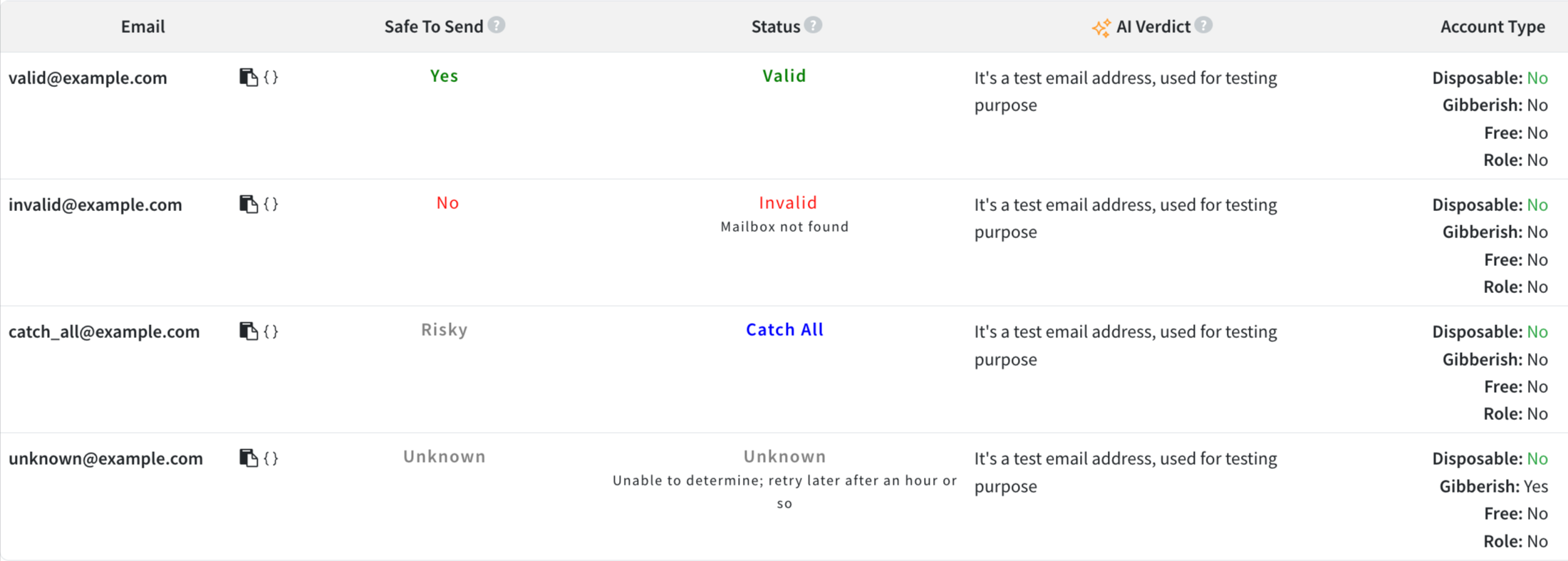
For each email, Quick Validation returns a status, safe to send, account type with AI Verdict

<div data-with-frame="true"><figure><img src="https://93738666-files.gitbook.io/~/files/v0/b/gitbook-x-prod.appspot.com/o/spaces%2FEXQQW0hsXyH0YD4ePoxb%2Fuploads%2FvFULMICQv7CqnR1NvLSF%2Fquick-validation-result.png?alt=media&#x26;token=9ae4d78f-ebf0-4813-b127-7187f42fdfe8" alt="quick validation result"><figcaption><p><a href="https://docs.clearout.io/api-overview.html#testing">Test email addresses</a> used to illustrate all result statuses</p></figcaption></figure></div>

<table><thead><tr><th width="143.92578125">Status</th><th width="387.015625">Meaning</th><th>Suggested action</th></tr></thead><tbody><tr><td>Valid</td><td>Address is reachable</td><td>Safe to use in campaigns</td></tr><tr><td>Catch All</td><td>Domain accepts all addresses</td><td>Use with caution</td></tr><tr><td>Invalid</td><td>Address does not exist or is unreachable</td><td>Remove from your list</td></tr><tr><td>Unknown</td><td>Temporary issue (for example, timeout or greylisting)</td><td>Retry later</td></tr></tbody></table>

## Limits

* Quick validation is intended for small, ad hoc checks.​
* For larger lists, use **Bulk Validation** under Email Verifier.

{% hint style="info" %}
If you are a developer, you can check sample code snippets in Node.js, PHP, or Python in the [API section](https://docs.clearout.io/developers/api)
{% endhint %}

## Verification history in Activities

All Quick Validation runs are logged in the **Activities** section.​

1. In the top navigation, go to **More → Activities.**
2. Filter by **Email Verifier** to see past runs.​

## Download a verification report.

From [Activities](https://app.clearout.io/activities), you can download a report for each Quick Validation run.​

1. Use email verification filters in Activities.
2. Click the corresponding **Download** icon or link.​
3. Save the report file (for example, CSV) and open it in your preferred tool to review or share results.​

{% hint style="info" %}
**Developer note**&#x20;

Want to automate this? Use the [Instant Verify](https://docs.clearout.io/developers/api/email-verify#post-email_verify-instant) API to run the same quick validation from your application
{% endhint %}


---

# Agent Instructions: Querying This Documentation

If you need additional information that is not directly available in this page, you can query the documentation dynamically by asking a question.

Perform an HTTP GET request on the current page URL with the `ask` query parameter:

```
GET https://docs.clearout.io/email-verifier/quick-validation.md?ask=<question>
```

The question should be specific, self-contained, and written in natural language.
The response will contain a direct answer to the question and relevant excerpts and sources from the documentation.

Use this mechanism when the answer is not explicitly present in the current page, you need clarification or additional context, or you want to retrieve related documentation sections.
